
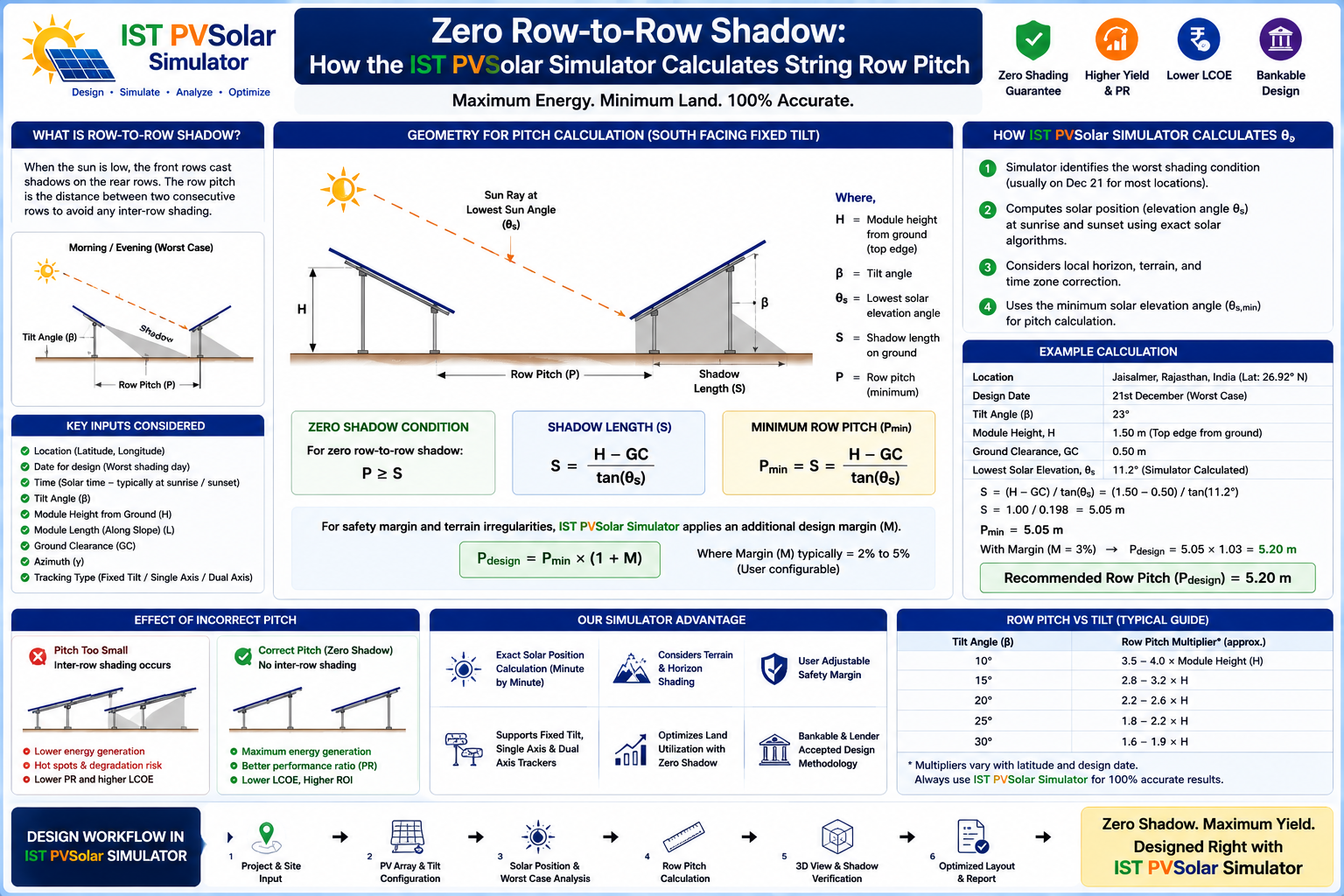
Zero Row-to-Row Shadow: How the IST PVSolar Simulator Calculates String Row Pitch
Inter-row shading is one of those losses that's easy to underestimate until you see it on a winter afternoon: the sun sits low on the horizon, and every row of modules throws a long shadow onto the row behind it. If your row spacing (pitch) is too tight, that shadow doesn't just dim a few cells — it can trigger the kind of partial-shading electrical mismatch that costs far more power than the shadow's area would suggest.
Getting pitch right is a genuine trade-off: space rows too far apart and you waste land (and money) that could've held more modules; space them too tight and you lose energy to shading you could have designed away. The IST PVSolar Simulator's Row Spacing Calculator exists to find the actual boundary between those two outcomes — not by a rule of thumb, but by tracking the real sun path across your site.
Finding the Worst Moment of the Day — Not Just Guessing at Noon
The naive approach to row spacing checks the sun's position at solar noon and calls it done. The problem is that noon is rarely the worst case — the sun is highest (shortest shadows) around noon and lowest (longest shadows) at the edges of your operating window, early morning and late afternoon.
The calculator instead scans your entire design time window — whatever start and end hours you set, in local apparent solar time (true solar noon, not clock time) — in 15-minute steps, computing the sun's actual altitude and azimuth at each one using the standard declination and hour-angle equations. It then identifies the single worst moment: the lowest sun altitude anywhere in that window. That's the moment your row spacing actually has to survive, not an average or an assumption.
The Pitch Formula, in Plain Terms
Once it knows the worst-case sun position, the calculation itself is straightforward geometry:
- V — the vertical height your tilted module row throws into shadow (module length × sin(tilt))
- F — the horizontal footprint your row physically occupies (module length × cos(tilt))
- Shadow gap needed — how far back the next row has to sit so that shadow doesn't reach it, accounting for both the sun's altitude and how far off-axis it is from your row's azimuth (a sun angled off to the side casts a shorter shadow along the row direction than one directly behind it)
- Pitch = gap + F — the shadow-free clearance plus the row's own footprint, giving you the true center-to-center (or edge-to-edge) spacing your layout needs
That's the same physical logic behind every credible row-spacing method in the industry — it's just computed here from your actual latitude, tilt, azimuth, and module geometry instead of a lookup table.
Full-Year Coverage, Not Just One Season
Sun angles change dramatically across the year, so the calculator doesn't stop at a single date. It runs the same worst-moment analysis for three representative dates — winter solstice, the equinox, and summer solstice — and reports the required pitch for each. In the northern hemisphere, winter typically demands the most spacing (the sun sits lowest), and the tool automatically flags which season is governing your design with a star marker, then sets your full-year shadow-free pitch to whichever season needs the most room. Get that one number right, and your array is shadow-free across the entire year within your chosen operating window — not just on the day you happened to check.
Choosing to Go Tighter — With the Trade-off Shown, Not Hidden
Sometimes the fully shadow-free pitch costs more land than a project can justify, and a developer deliberately accepts some shading loss to fit more capacity on a constrained site. The calculator supports that decision without pretending it's free: every season's suggested pitch is editable, and the moment you tighten it below the shadow-free value, the tool immediately shows you:
- Live GCR (ground coverage ratio) at your chosen spacing
- Front-side shading percentage at the worst moment of that season, color-coded so a small, likely-tolerable loss reads differently from a large one
- Bifacial gain and ground-albedo capture, computed through the same infinite-sheds view-factor model used elsewhere in the engine — because tighter spacing doesn't just cost front-side shading, it also changes how much reflected ground light reaches a bifacial module's rear side
That means a land-use decision gets made with the actual energy consequence in front of you, not discovered later in an annual yield report disconnected from the layout choice that caused it.
You Can See It, Not Just Read the Numbers
The calculator renders synchronized side, 3D, and front views of your row layout with the sun animated moving through the day at whichever season you're inspecting — so a shadow either visibly clears the next row or visibly doesn't. For anyone who isn't fluent in reading tangent-of-altitude formulas, watching the shadow line move is a far faster way to build confidence in a spacing decision than trusting a table of numbers alone.
It Feeds Straight Into Your Real Layout
Like the other design tools in the simulator, this isn't a side calculator you have to transcribe results from. The full-year shadow-free pitch (or your deliberately tightened value) applies directly to your project's row-spacing setting, which in turn drives the same shading calculations used in your generation report. There's no separate spreadsheet to keep in sync and no risk of your row-spacing decision quietly drifting away from what your yield estimate actually assumes.
Whether you use the calculator's shadow-free suggestion or knowingly trade some shading loss for a tighter footprint, the decision is made with the real sun geometry — and the real energy trade-off — visible in front of you, not assumed away.